


FidelityAgent ONE
4.2131.00 Reviews
App Specs
- Version
- 4.8.5.1.5
- Updated On
- License
- Free
- Downloads
- 50,000+
- Developer
- PalmAgent
- Categories
- Finance
- Platform
- Android
Screenshots
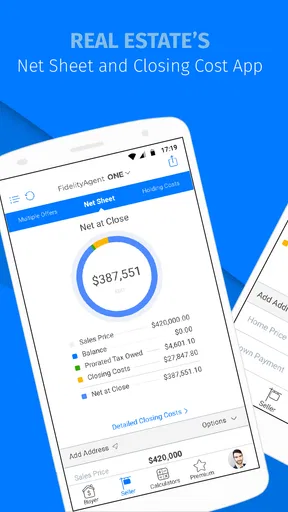
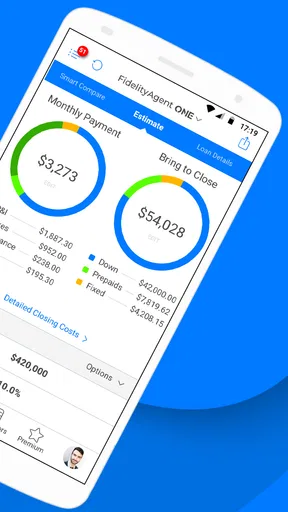
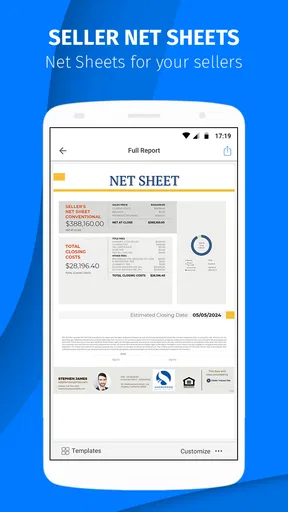


 Analysis by AppCompare
Real estate work rarely stays inside one neat task. A professional may need to check a transaction detail, move between appointments, answer a client, and keep a deal moving before the day is over. FidelityAgent ONE is built for that working rhythm rather than for casual personal finance. I found its strongest appeal in the way it places a real-estate-focused tool on a mobile device, where quick access can matter more than a large desktop workspace.
Developed by PalmAgent, this free finance app is aimed at real estate professionals and carries an Everyone age rating. Its average rating is 4.2 from around 300 ratings, with more than 100 written reviews, and it has passed 50 thousand installs. Those figures suggest a useful, established niche rather than a mainstream consumer banking app. After spending time with it, my view is that its lasting value depends less on novelty and more on whether your daily work already fits the kind of real estate workflow it supports.
From a promising first week to a practical working habit
During the first week, the main attraction is straightforward: the app feels more relevant to property professionals than a general budgeting, banking, or note-taking tool. A general finance app may be polished, but it usually makes you translate your work into categories designed for ordinary personal money management. FidelityAgent ONE starts from a different point of view, which can make the first sessions feel more purposeful.
I would not describe it as an app that replaces every system used by an agency. Instead, I see it as a mobile companion for moments when opening a full desktop setup is inconvenient. That distinction matters. If you expect a complete office platform in your pocket, the experience may feel narrower than expected. If you want a focused way to stay connected to real estate activity while away from a desk, the app makes more sense.
A realistic example is a busy agent moving between a showing and a client meeting. Rather than waiting until returning to the office, the agent can use the mobile app as part of the workday routine, checking the relevant information before speaking with a buyer or seller. The benefit is not dramatic automation; it is reducing the number of small interruptions that cause people to postpone a task.
That is also where I noticed an important trade-off. Mobile access encourages speed, but speed can tempt users to treat the phone as the main place for every decision. I would use the app for timely reference and action, then reserve detailed review or broader organization for the tools the office already relies on. This approach keeps the app useful without forcing it into a role it may not be intended to fill.
The first-week appeal also comes from familiarity. People who already spend much of their day handling property-related work do not need to learn an unrelated personal-finance model before seeing the point. The context feels closer to their professional life. That can make adoption easier for an individual agent, especially when the alternative is juggling several disconnected mobile tools.
Worth Reading Before You Choose

EA SPORTS FC Mobile 26 Is a Bigger Football Game, but It Takes Time

Flipboard Shows What News Apps Must Do Beyond the Feed

Switching to Android Auto Means Rethinking Your Driving Routine

Google Calendar Makes a Crowded Week Easier to Manage

Ludo King Makes the Most of the Minutes Between Plans

Baby Panda World Brings Quick Play to Modern Phones, but Its Game Library Feels Busy
Who gets the most value from the mobile format
I would recommend trying it first if you are an active real estate professional who regularly works away from a desk and needs a convenient way to stay engaged with work between appointments. It is particularly suitable for someone who values access and continuity more than a long list of consumer finance features.
It is less convincing for someone looking for a household budget, investment tracker, expense scanner, or everyday banking replacement. The finance category can create the wrong expectation here. This is not the kind of app I would choose to manage personal spending, compare bank accounts, or build a family budget. Its identity is professional and real-estate-oriented, so a general-purpose financial app will be a better fit for those needs.
Teams should also think about consistency before encouraging broad adoption. A mobile tool is only useful when everyone understands which tasks belong there and which tasks remain in the office’s primary systems. Without that agreement, the app can become another place to check, rather than a reliable part of the workflow.
What changes after the first month
After the initial interest fades, the important question becomes whether the app saves enough small amounts of effort to deserve a permanent place on the phone. In my experience, the answer is yes for users who open it repeatedly during active transactions, but much less clearly for people who only need occasional reference.
The recurring value comes from habit. A real estate professional may begin the day by checking the app, use it again before an appointment, and return to it when a client asks an unexpected question. None of those moments is necessarily spectacular. Together, they can make the app worthwhile because the user stops treating it as a separate project and starts treating it as one step in the normal workday.
One useful habit is to connect app use to existing transitions rather than setting aside a special session. Checking it when leaving an office, arriving at a property, or finishing a meeting is more realistic than promising to review everything at night. This reduces the risk that the app becomes a forgotten icon after the first week.
Another practical insight is to avoid using mobile convenience as an excuse for incomplete records. I would make the quick check on the phone, then complete any careful follow-up in the main system as soon as possible. That two-stage workflow may sound less elegant than doing everything in one place, but it prevents rushed mobile actions from becoming the only record of an important transaction.
The app’s free price lowers the barrier to testing that routine. There is no purchase required to begin, although optional in-app purchases range from less than a dollar to around ten dollars per item. I would treat those purchases cautiously: first establish that the core workflow actually fits your role, then decide whether an optional item solves a recurring problem rather than merely adding short-term convenience.
For a solo agent, that decision is personal. For a team, it should be discussed before anyone assumes that optional purchases are essential. Small costs can become distracting when several people use an app differently, especially if the organization has not agreed on a shared process.
Maintenance is mostly about behavior, not constant setup
Every professional app creates maintenance, even when the interface itself is simple. The largest burden here is likely behavioral: remembering to use the app at the right moments, keeping mobile activity aligned with the office workflow, and resisting the temptation to scatter information across too many tools.
I would keep the maintenance routine deliberately small. Decide what the app is for, choose two or three moments in the workday when it should be checked, and avoid opening it simply because it is available. That makes it easier to judge its real value. If the app helps with those specific moments, keep it. If it repeatedly sends you back to another system without saving time, reduce its role.
Version 4.8.5.1.5 shows that the app has continued through multiple iterations rather than remaining frozen in its earliest form. It supports devices running Android 7.0 or newer, which covers a broad range of still-used Android phones. Even so, users with older hardware should judge the experience by their own device, screen size, and general responsiveness rather than assuming that compatibility alone guarantees comfort.
That Android requirement is also a practical consideration for offices with mixed devices. If some colleagues use iPhones or a different operating system, the team should avoid building a process that depends entirely on one person’s mobile setup. FidelityAgent ONE may be perfectly useful for the individual who chooses it, but shared operations need a wider plan.
Maintenance also includes knowing when not to open the app. Constant checking can create the illusion of productivity while interrupting conversations and travel. I prefer a purposeful rhythm: use it when a real decision or follow-up is waiting, not as a background habit that competes with clients.
Where fatigue begins to appear
The first source of fatigue is context switching. Real estate professionals already move among calls, messages, calendars, documents, and office systems. Adding another app can help only if it replaces friction. If it simply adds one more place to inspect, the benefit will decline over time.
The second is the gap between mobile convenience and professional depth. A phone is excellent for quick access, but less comfortable for comparing extensive information, composing detailed notes, or reviewing a complicated transaction for a long period. I would not judge the app harshly for that limitation; it is a natural trade-off of the format. Still, users should plan around it rather than expecting the small screen to behave like a full workstation.
A third source of fatigue is unclear boundaries. If you are unsure whether a task should be completed in FidelityAgent ONE, an office platform, email, or a document system, the app can increase uncertainty instead of reducing it. The solution is to define its role early. For example, use it for mobile access during the day, but keep the authoritative long-form record elsewhere if that is how your organization already works.
The optional purchases can add another layer of hesitation. Even at modest amounts, a user may wonder which items are genuinely useful and which are unnecessary extras. I would avoid buying anything during the novelty phase. Use the free experience long enough to identify a repeated limitation, then consider whether a purchase addresses that exact issue.
There is also a personal-focus question. Some professionals want one unified platform with a consistent design across every task. Others are comfortable with a specialized tool that handles one part of the job well. FidelityAgent ONE is more appealing to the second group. If visual consistency and all-in-one organization matter more to you than specialization, your existing agency platform or a broader real estate suite may be the better long-term choice.
How it compares with the usual alternatives
Compared with a general finance app, this tool has a clearer professional purpose. A budgeting app may offer stronger personal-money organization, while a banking app will naturally be better for payments and account management. Neither is designed around the day-to-day perspective of a real estate professional, so they are not direct substitutes.
Compared with a full desktop real estate platform, the advantage is mobility and immediacy. The desktop option will usually feel more suitable for extended review, larger amounts of information, and office-wide administration. FidelityAgent ONE is the more convenient choice when the user is moving, waiting between appointments, or responding to work away from the desk.
Compared with a notes app or spreadsheet, the specialized context is the main reason to choose it. A spreadsheet can be flexible, but flexibility often means building and maintaining your own structure. A notes app is quick, but it may leave you organizing important information manually. The trade-off is that a general tool can be adapted to almost anything, while a specialized app may be more useful only within its intended professional setting.
My practical comparison is therefore simple: choose this app when mobile real estate access is the recurring problem; choose a broad office platform when coordination and complete administration are the bigger concern; choose a personal finance app when your goal is managing household money. The right answer depends on the job you need done, not on which category name appears in the store.
Questions I would settle before relying on it
If you are wondering whether it costs anything to start, the app itself is free, with optional in-app purchases priced from $0.99 to $9.99 per item. I would begin without spending and evaluate whether the daily workflow becomes easier. That gives you a clearer basis for deciding whether any optional purchase is justified.
If compatibility is your concern, the listed minimum is Android 7.0. That makes it accessible to many Android users, but the age and condition of a particular phone still matter. I would test it on the actual device used during appointments, not only on a newer personal phone.
If you are deciding whether it is suitable for personal finances, my answer is no. Its focus is real estate professionals, so it should not be confused with a household budgeting or banking app. The professional focus is its reason to exist and also the reason it will not suit everyone.
If you are asking whether it can replace every workplace system, I would not plan on that. I see it as a mobile part of a broader workflow. Use it where it saves time, but keep your organization’s established process for detailed records, collaboration, and tasks that need a larger workspace.
Finally, if you are unsure whether it will remain useful after the first month, track behavior rather than excitement. Notice whether it helps during real appointments, follow-ups, or transaction-related decisions. If you open it naturally because it removes a repeated obstacle, it has earned a place. If you keep searching for reasons to use it, the novelty has probably done more work than the app itself.
My long-term verdict
FidelityAgent ONE is not a universal finance solution, and I would not recommend it to someone who wants one app for banking, budgeting, or personal money management. Its value is narrower and more practical: it gives real estate professionals a mobile-focused tool that can fit into a day spent away from a desk.
What I like most is the possibility of turning scattered moments into a dependable routine. The app does not need to transform the entire job to be worthwhile. It only needs to make recurring mobile tasks easier without creating another layer of confusion. For the right user, that is a meaningful form of lasting value.
What gives me pause is the maintenance of boundaries. Users must decide what belongs in the app, what belongs in the office system, and when optional purchases are actually justified. Professionals who ignore those decisions may end up with more checking and more context switching rather than less.
With its free entry point, established presence, and focus on real estate work, I think it is worth testing if that describes your day. My recommendation is to give it a defined trial routine rather than installing it passively: use it during the mobile parts of your work, compare the effort with your usual alternative, and keep it only if the benefit continues after the first-week appeal disappears. Its strongest feature is not novelty but the chance to become a small, repeatable part of a real estate professional’s working day.
For me, that earns it a qualified long-term recommendation. It deserves lasting space on the phone of an agent who needs this specific kind of access, while everyone else should choose a tool built around their actual financial or administrative needs.
Pros
- Unified access to Fidelity investment accounts and financial information.
- Useful tools for monitoring portfolios
- balances
- and account activity on the go.
- Secure login options help protect sensitive financial data.
- Clean interface makes common account tasks relatively easy to find.
- Convenient for checking investments without using a desktop browser.
Cons
- Features may vary depending on your Fidelity account type and eligibility.
- Some advanced trading or research tools may be better on the desktop platform.
- Requires a reliable internet connection for current balances and market data.
- Frequent market updates can encourage unnecessary checking or impulsive decisions.
- App performance may depend on device compatibility and operating system version.
FAQs for FidelityAgent ONE
What is FidelityAgent ONE used for?
FidelityAgent ONE is designed for Fidelity National Title Group agents and authorized business partners who need mobile access to title and escrow-related tools. Depending on your organization’s setup, it may help you manage transactions, review order information, access documents, communicate with contacts, and stay updated while working away from the office. Its available features can vary by account, role, and regional configuration.
Who can download and use FidelityAgent ONE?
Although the application may be available for download on Android or iOS, it is generally intended for registered Fidelity National Title Group agents, employees, and approved partners rather than the general public. You will normally need valid organizational credentials or an invitation before you can sign in. Downloading the app alone does not guarantee access, so confirm eligibility with your Fidelity representative or company administrator.
Does FidelityAgent ONE require an internet connection?
FidelityAgent ONE primarily relies on an internet connection because it needs to securely retrieve current transaction data, documents, messages, and account information from online services. It may open some previously loaded content depending on the version, but you should not assume that all functions work offline. For reliable use, connect to a stable Wi-Fi or mobile-data network before starting important tasks.
Is FidelityAgent ONE secure for handling transaction information?
The app is intended for professional use and is built to provide controlled access to Fidelity-related information, but users should still follow normal security practices. Use a strong device passcode, keep the operating system and app updated, avoid sharing login details, and sign out on shared devices. Never download confidential documents onto an unsecured phone or use public networks for sensitive work unless your organization permits it.
What should I do if I cannot log in or the app is not working correctly?
First, check that your username, password, and network connection are correct, then update FidelityAgent ONE and restart your device. If your organization uses multifactor authentication, verify that the approval or security code has been completed. Persistent problems may be related to account permissions, maintenance, or an expired invitation. Contact your company administrator, Fidelity support contact, or the support option listed in the app.


